In this article
- Table of Contents
- How QR Codes Work When You Scan One
- What Are the Three Large Squares?
- The Small Squares Carry the Information
- Why a Damaged QR Code Can Still Work
- Why QR Codes Need Empty Space Around Them
- What Can a QR Code Store?
- Static and Dynamic QR Codes
- QR Codes Can Also Be Used for Scams
- Final Takeaway
Table of Contents
You see them on restaurant menus, tickets, product packaging, posters, payment screens, business cards, and advertisements.
Point your phone at the strange black-and-white square and, within seconds, a website or another digital experience appears.
That square is a QR code.
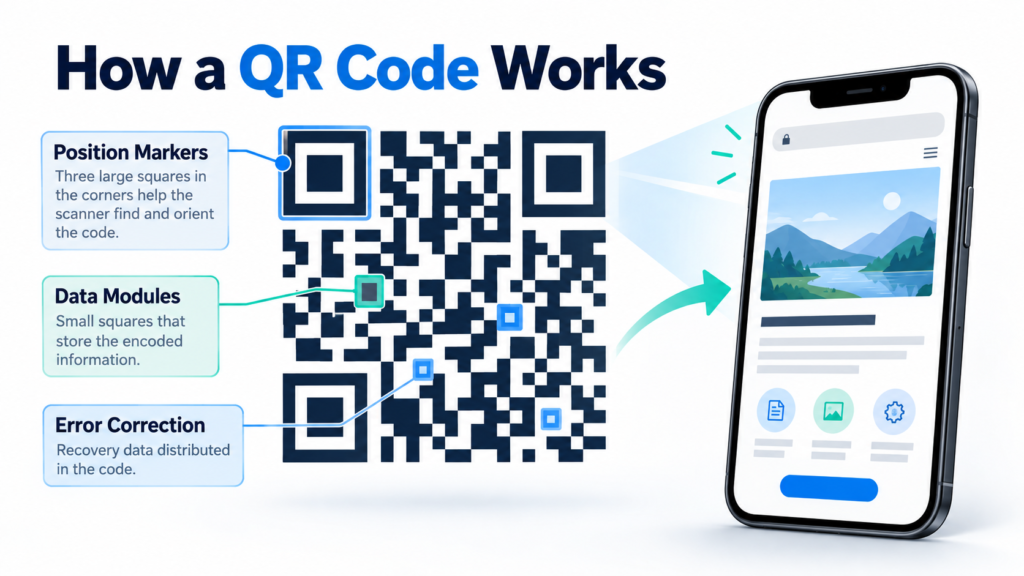
QR codes can look random, but every part of the pattern serves a purpose. The arrangement allows scanners and smartphone cameras to identify the code, determine its orientation, read the encoded information, and recover some data even when part of the symbol is damaged.
Understanding how QR codes work makes that familiar little square far more interesting.
How QR Codes Work When You Scan One
A QR code is a type of two-dimensional barcode.
Traditional retail barcodes generally arrange information across lines in one direction. A QR code uses both horizontal and vertical space, allowing it to hold substantially more information.
When you point a compatible camera at a QR code, software first identifies the symbol.
It then examines the pattern of dark and light modules — the small squares that make up the code — and decodes the information stored inside.
That information might be a web address, text, an identifier, contact information, or other encoded data.
If the QR code contains a web address, your phone can offer to open that address in a browser.
The physical square itself is not connecting to the internet.
It is simply storing information that your device knows how to interpret.
What Are the Three Large Squares?
One of the easiest parts of a QR code to recognize is the group of large square patterns near three corners.
These are position-detection patterns.
They help a scanner identify the QR code and determine its orientation.
That is why you generally do not need to hold a QR code perfectly upright before scanning it.
DENSO WAVE’s official QR Code guide explains that these position-detection patterns allow QR codes to be read from different directions.
Once the scanning software understands where the code is positioned, it can begin interpreting the rest of the symbol correctly.
The Small Squares Carry the Information
The many smaller black-and-white squares are called modules.
Their arrangement represents encoded data along with information needed for the QR code to function correctly.
A simple code containing a short web address may have fewer modules than one containing considerably more data.
QR codes come in different versions.
DENSO WAVE documents versions ranging from Version 1, which uses a 21-by-21 module structure, through Version 40, which uses 177-by-177 modules. Higher versions can accommodate more information.
This is why some QR codes look relatively simple while others appear extremely dense.
Why a Damaged QR Code Can Still Work
One of the cleverest parts of QR technology is error correction.
You may have scanned a QR code that was slightly scratched, dirty, faded, or partly covered and wondered why it still worked.
QR codes can include additional error-correction information that helps reconstruct missing or damaged data.
DENSO WAVE describes four error-correction levels: L, M, Q, and H. Higher levels provide greater restoration capability but also require more space within the code. At the highest standard level, approximately 30% of codewords can potentially be restored, although successful recovery depends on how the damage occurs.
This does not mean you can cover any 30% of a QR code and expect it to work.
Damage in important areas can still prevent successful scanning.
Why QR Codes Need Empty Space Around Them
You may notice that professionally created QR codes normally have an empty border around the outside.
That space is not merely decorative.
It is known as the quiet zone.
The clear border helps scanners distinguish the QR code from surrounding text, graphics, or other visual elements.
DENSO WAVE specifies a four-module-wide quiet zone around a standard QR code.
This explains why overly decorative QR designs can sometimes become difficult to scan.
Adding logos, images, unusual shapes, or text too close to the code can interfere with readability if the design ignores the underlying QR standard.
What Can a QR Code Store?
People often associate QR codes exclusively with websites, but they can encode different forms of information.
A QR code might contain text, an identifier, contact information, or instructions that an application knows how to interpret.
Web addresses are especially common because they allow a printed object to become an entry point to changing online information.
GS1, the global standards organization behind many product-identification systems, is also expanding the use of QR codes for product information.
Its Digital Link standard allows a product identifier to connect consumers and businesses with information such as ingredients, instructions, sustainability information, or other online resources.
That creates a bridge between physical packaging and digital information.
Static and Dynamic QR Codes
You may also hear services advertise “static” and “dynamic” QR codes.
A static QR code directly contains the final information, such as a specific website address.
If that website address changes, the printed code does not automatically change with it.
Many so-called dynamic QR services solve this by encoding a redirect address controlled by the QR service. The service can later change where that redirect sends visitors.
The QR pattern remains the same because the encoded redirect address has not changed.
This can be useful for printed marketing materials, but it also means the continued function of the code may depend on the redirect service remaining active.
QR Codes Can Also Be Used for Scams
Convenience creates an opportunity for abuse.
A QR code can send you to a legitimate restaurant menu.
It can also send you to a fraudulent website.
Unlike a normal web link, you cannot easily read the destination simply by looking at the pattern.
Before opening a QR destination, check the address your phone displays when possible.
Be especially cautious if a QR code asks you to enter passwords, payment-card information, banking credentials, or other sensitive data.
The QR technology itself is not malicious.
The destination encoded inside it can be.
Final Takeaway
Understanding how QR codes work comes down to a few basic ideas.
The black-and-white modules store encoded information.
The large corner patterns help scanners determine orientation.
Error correction can help recover information when parts of the symbol are damaged.
And once the code is decoded, your device decides what to do with the information inside it.
A QR code may look like a random collection of squares.
In reality, it is a carefully structured way of connecting the physical world with digital information.
Related Reading: Semantic Search