In this article
Table of Contents
Connecting to the internet feels almost instant. You open a browser, visit a website, and the page appears.
Behind that simple action, information is moving between your device, your internet provider, network infrastructure, and the website or service you are using.
A VPN, or virtual private network, adds another layer to that connection.
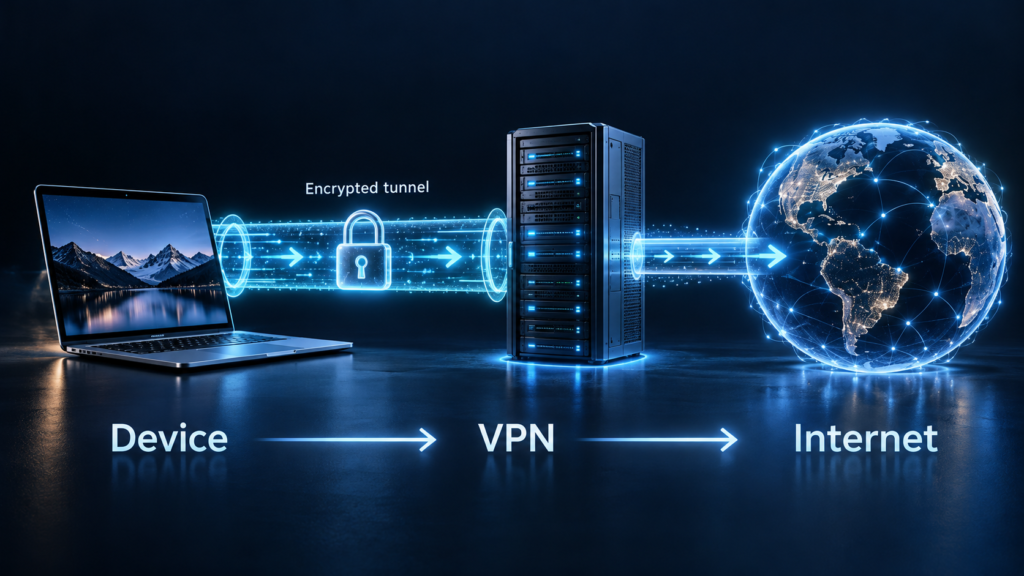
Instead of sending internet traffic directly from your device toward its destination, VPN software creates a protected connection between your device and a VPN server. Your internet traffic then continues to its destination from that server.
VPNs are widely used by businesses for remote access, but consumer VPN services have also become popular with people who want additional privacy or protection when using networks they do not fully trust.
The National Institute of Standards and Technology’s definition of a virtual private network describes a VPN as a virtual network built on existing networks that can provide a secure communication mechanism for information transmitted between systems.
How a VPN Works
Without a VPN, your device normally connects to the internet through your internet service provider.
When you turn on a VPN, your device first establishes a connection with the VPN provider’s server.
Traffic traveling through that connection is protected using encryption according to the VPN protocol and configuration being used.
A simplified version looks like this:
Your Device → Encrypted VPN Connection → VPN Server → Internet
The website you visit generally sees the public IP address associated with the VPN server rather than the public IP address your internet provider assigned to your connection.
This is one reason VPNs are often described as hiding your IP address.
However, hiding an IP address is not the same thing as becoming completely anonymous online.
Why People Use VPNs
One common reason for using a VPN is to protect communications across networks that may not be fully trusted.
Public Wi-Fi in airports, hotels, cafés, and other shared locations can create situations where you have less control over the network infrastructure.
A VPN can add an encrypted connection between your device and the VPN server.
Businesses also use VPN technology to allow employees to securely connect to internal company networks while working remotely.
NIST notes that VPN technologies can provide protections such as confidentiality and integrity for communications across public networks. It also makes an important point: VPNs can reduce networking risks, but they cannot eliminate all of them.
That limitation is important for everyday users.
A VPN Does Not Make You Invisible
VPN advertisements sometimes make the technology sound like an invisibility switch.
It is not.
A VPN changes who can see certain parts of your internet connection, but it does not eliminate every form of tracking.
For example, if you sign into your Google, Facebook, Amazon, or another personal account while using a VPN, that service can still know that you are signed in.
Websites can also use cookies and other techniques to recognize browsers or sessions.
Your VPN provider itself also becomes an important part of the trust equation because your traffic is passing through its infrastructure.
Using a VPN therefore shifts some trust away from the local network and internet provider toward the VPN service.
That makes choosing a reputable provider more important than simply installing whichever free VPN appears first in an app store.
VPNs and HTTPS Work Together
You may notice that most modern websites begin with HTTPS.
HTTPS encrypts communication between your browser and the website you are visiting.
A VPN protects a different part of the connection by creating an encrypted tunnel between your device and the VPN server.
These technologies can therefore work together rather than replacing one another.
If you visit an HTTPS website while using a VPN, the website connection remains protected by HTTPS while your connection to the VPN server is protected through the VPN.
This is also why a VPN should not be treated as a replacement for normal online-security habits.
What a VPN Cannot Protect You From
A VPN cannot stop every cyber threat.
If you click a convincing phishing link and voluntarily enter your password into a fake website, a VPN does not magically know that you made a mistake.
It also cannot guarantee that downloaded software is safe.
Malware, weak passwords, stolen account credentials, malicious browser extensions, and fraudulent websites remain risks whether a VPN is running or not.
VPN protection is therefore best understood as one part of a broader security approach.
Strong unique passwords, multifactor authentication, updated software, HTTPS websites, and careful browsing habits still matter.
Can a VPN Change Your Apparent Location?
Because websites generally see the VPN server’s public IP address, a VPN can sometimes make your internet connection appear to originate from the location of that server.
For example, someone physically located in one city could connect through a VPN server in another region.
This is why VPN services often advertise servers in multiple countries.
However, websites and apps may use information beyond an IP address to determine location. A device may also have GPS or other location services enabled.
A VPN therefore changes the network-level IP address seen by online services, but it should not be assumed to override every possible method of determining location.
Free VPNs Deserve Extra Attention
Running VPN infrastructure costs money.
Servers, bandwidth, software development, customer support, and security all have costs.
That does not automatically mean every free VPN is unsafe, but it does mean users should understand how the service operates and how the provider makes money.
Before choosing a VPN, it is worth reviewing the provider’s privacy policy, ownership, security history, logging practices, supported protocols, pricing, and reputation.
A VPN handles sensitive network traffic.
It should be chosen with more care than an ordinary entertainment app.
Do You Need a VPN All the Time?
There is no universal answer.
A remote employee may need a company VPN whenever accessing internal systems.
A traveler may value additional protection while regularly using unfamiliar networks.
Another person using a trusted home network and HTTPS websites may have different needs.
VPNs can also introduce trade-offs. Routing traffic through an additional server can sometimes affect connection speed or latency.
The useful question is not simply whether VPNs are good or bad.
It is whether a VPN solves a specific privacy, security, or network-access problem you actually have.
Final Takeaway
A VPN creates a protected connection between your device and a VPN server before your traffic continues across the internet.
It can be useful for securing communications over public networks, protecting remote access, and preventing websites from directly seeing your normal public IP address.
But a VPN does not make you completely anonymous, stop phishing, remove malware, replace HTTPS, or eliminate the need for strong account security.
The best way to think about a VPN is as another security layer.
Useful? Yes.
Magic? No.
Related Reading: Cloud Computing for Beginners